



Introduction
Jenga is a classic game where players carefully remove one block at a time from a tower and place it on top without causing the tower to collapse. In this project, you will recreate this game inside PictoBlox 3D & XR Studio using physics simulation and block-based programming.
This activity introduces learners to concepts such as:
- Physics simulation
- Object interaction
- Variables
- Player turns
- Event handling
- Mouse interactions
By the end of this activity, you’ll have a fully playable 3D Jenga game.
Prerequisites
Before starting this project, you should know:
- Basics of PictoBlox 3D & XR Studio
- Variables
- Events
- Mouse Events
- Object Selection
- Basic Physics
Concept / Logic Explanation
The game follows a simple two-player turn-based system.
Game Logic
- When the scene starts
- Physics is enabled.
- All Jenga blocks become draggable.
- Player scores are reset.
- Player 1 gets the first turn.
- During Gameplay
- A player removes one block.
- After every successful move.
- the turn changes to the next player.
- The game continues until the tower collapses.
Variables used:
| Variable | Purpose |
| Player 1 | Stores Player 1 score |
| Player 2 | Stores Player 2 score |
| Current Chance | Stores whose turn it is |
| temp | Used to switch turns |
Step-by-Step 3D Model Making
Step 1: Create the Scene
Open PictoBlox 3D & XR Studio.
Create a simple indoor room.
Add:
- Floor
- Table
- Sofa
- Decorative objects
This creates an attractive environment for the game.
Step 2: Build the Jenga Tower
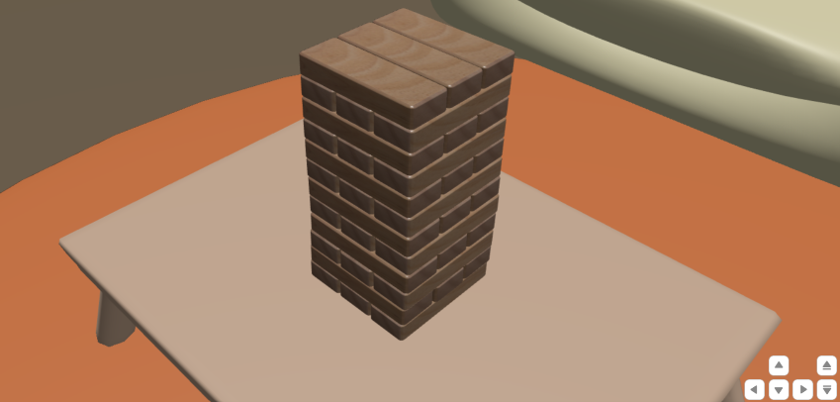
From the Library, add a wooden block.
Duplicate it multiple times.
Arrange the blocks in alternating horizontal and vertical directions.
Create a tower consisting of 36 wooden blocks.
Step 3: Enable Physics
Select all Jenga blocks.
Enable Physics so the blocks behave naturally.
Now every block will react realistically when pushed or removed.
Step 4: Add UI Elements
Create:
- Welcome Screen
- Instruction Screen
- Start Button
- Current Player Annotation
These UI elements guide the player before the game begins.
Step-by-Step Block Coding Guide
Step 1: Initialize the Game
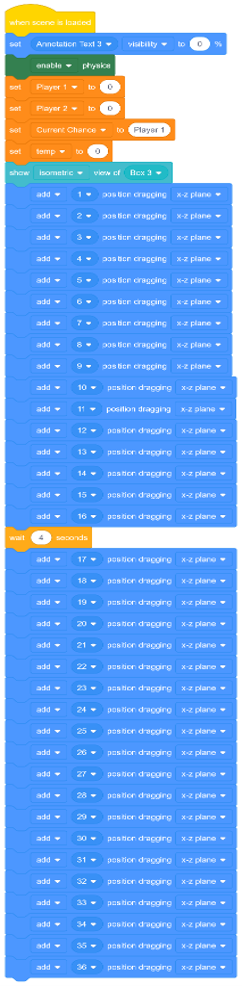
When the scene loads:
- Hide the player annotation
- Enable Physics
- Reset Player 1 score
- Reset Player 2 score
- Set Current Chance = Player 1
- Set temp = 0
- Display an isometric camera view
Next,
Enable Position Dragging for all 36 blocks.
This allows players to drag only the Jenga blocks.
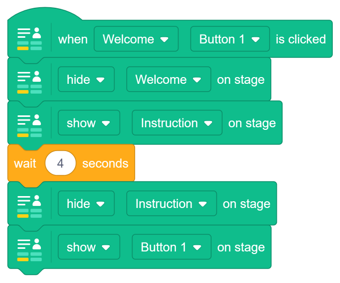
Step 2: Create the Welcome Screen
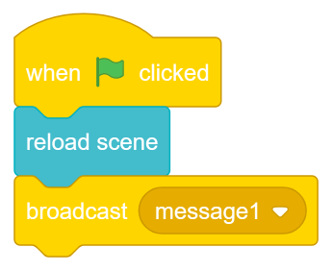
When the Green Flag is clicked:
- Reload the scene
- Broadcast message1
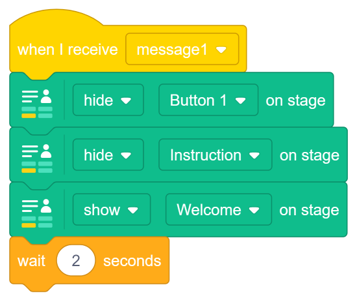
When message1 is received:
- Hide Start Button
- Hide Instructions
- Show Welcome Screen
After 2 seconds,
- Hide Welcome Screen
- Show Instruction Screen
Finally,
- Display the Start Button.
Step 3: Start the Game
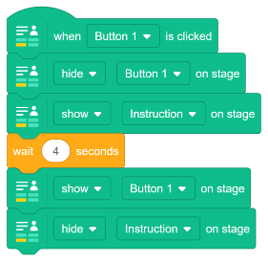
When the Start Button is clicked:
- Hide the button
- Hide Instructions
- Begin the gameplay
Players can now interact with the tower.
Step 4: Switch Player Turns
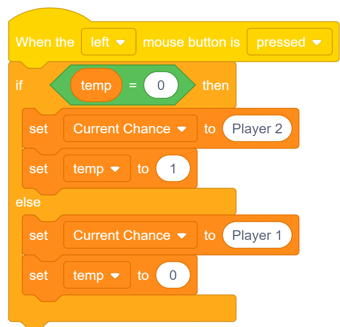
Whenever the left mouse button is pressed, Check the value of temp.
If temp = 0
then
- Current Chance = Player 2
- temp = 1
Otherwise
- Current Chance = Player 1
- temp = 0
This creates an alternating turn system between both players.
Step 5: Reload the Scene
To ensure a fresh start every time the game is played, reload the 3D scene when the Green Flag is clicked. After reloading, broadcast a message to display the welcome screen and begin the game flow.
Step 6: Display the Welcome Screen
When message1 is received, hide the Start Button and Instruction Panel, then display the Welcome Screen for 2 seconds before proceeding to the next stage of the game.
Output
The final project should include:
- A realistic 3D room
- A wooden Jenga tower
- Physics-enabled blocks
- Drag-and-drop interaction
- Two-player gameplay
- Automatic player turn switching
- Welcome and instruction screens
Conclusion
In this activity, you learned how to build a complete 3D Jenga Game using PictoBlox 3D & XR Studio. You explored creating a 3D environment, enabling physics, making objects interactive, and implementing a turn-based gameplay system using variables and events. This project demonstrates how coding and 3D design can be combined to create engaging and interactive games.