
LED (Arduino Alvik)

LED (Arduino Alvik)
Extension Description
Control the onboard RGB LEDs of Arduino Alvik, switch them ON or OFF, and display different colours using PictoBlox blocks and Python functions.

Introduction

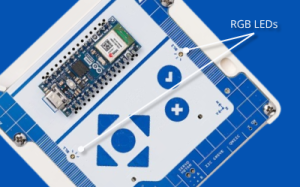
The LED (Arduino Alvik) blocks allow users to control the robot’s two onboard RGB LEDs directly from PictoBlox. These LEDs can display different colours and provide visual feedback during robotics activities.

Using these blocks, you can:

  • Turn the left or right RGB LED ON or OFF.
  • Set an RGB LED to a selected colour.
  • Display visual feedback for different robot actions.
  • Create colour-based signals, alerts, and indicators.

These blocks are useful for creating visual notifications, interactive robotics projects, and colour-based feedback systems.

Alvik Internal Components

Connecting Arduino Alvik with PictoBlox

Before using the LED (Arduino Alvik) blocks, connect your robot to PictoBlox using USB or Bluetooth.

Follow the step-by-step instructions in the Arduino Alvik Connection Guide.

CTR of Arduino Alvik Connection Guide

Read More

PictoBlox Blocks

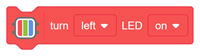
This block turns the selected onboard RGB LED ON or OFF. Users can independently control the left or right LED to indicate different robot states.
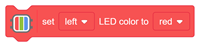
This block sets the selected RGB LED to a specified colour, such as red, green, blue, yellow, magenta, cyan, or white.
All articles loaded
No more articles to load

Python Functions

Sets the RGB output of the selected LED. To switch the selected LED off, the equivalent all-zero RGB values can be used where supported.
Syntax: set_color(1, 1, 1)
This method sets the selected LED to a specified colour using red, green, and blue components.
Syntax: set_color(1, 0, 0)
All articles loaded
No more articles to load
Table of Contents