
Sensors (Quarky Intellio)

Quarky Intellio Extension
Extension Description
Blocks and Python functions to detect button presses, measure distance using an ultrasonic sensor, and read analog or digital sensor values.

Introduction

The Sensors (Quarky Intellio) extension allows users to read inputs from different sensors connected to Quarky Intellio. It provides blocks and Python functions for detecting button presses, measuring distance with an ultrasonic sensor, and reading analog or digital sensor values.

Using this extension, you can:

  • Detect when the push button on Quarky Intellio is pressed.
  • Connect and initialize an ultrasonic sensor.
  • Measure distance using ultrasonic waves.
  • Read values from analog sensors.
  • Read values from digital sensors.

This extension is useful when working with sensor-based interaction, environmental monitoring, and robotics projects using Quarky Intellio.

Connecting Quarky Intellio with PictoBlox

Let’s begin by first connecting Quarky Intellio to PictoBlox. Follow the step-by-step instructions in the Quarky Intellio Connection Guide to establish the connection.

Refer to the guide here:Connection Guide Redirection Page
Read More

PictoBlox Blocks

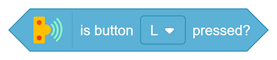
This block checks whether the specified push button on Quarky Intellio (such as L or R) is pressed.
This block initializes the ultrasonic sensor using the selected echo and trig pins. The pins can be set to A1, A2, or S1.
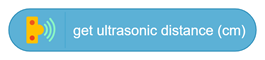
This block measures the distance using the ultrasonic sensor and returns the value in centimeters.
This block returns the analog value of the sensor connected to the specified pin between 0 and 4095. The pins can be set to A1 or A2. You can select different sensor types from the dropdown, including: light / photoresistor, soil moisture, raindrop, sound/microphone, gas sensor, joystick X, joystick Y, generic.
This block returns the state of a digital sensor connected to the specified pin. The pins can be set to A1, A2, or S1. It can be used with sensors such as: PIR, hall effect / magnetic field, generic.
All articles loaded
No more articles to load

Python Functions

The function detects whether the push button on Quarky Intellio is pressed.
Syntax: readpushbutton(‘1’)
The function initializes the ultrasonic sensor using the selected echo and trig pins.
Syntax: connectultrasonic(echo_pin, trig_pin)
The function measures the distance using the ultrasonic sensor and returns the value in centimeters.
Syntax: readultrasonic( )
The function reads the analog value from the specified pin and returns a value between 0 and 4095.
Syntax: readanaloginput(‘1’,’2’)
This function returns the state of a digital sensor connected to the specified pin.
Syntax: readdigitalniput(‘3’,’2’)
All articles loaded
No more articles to load
Table of Contents