



Introduction
Ready to make math magic?
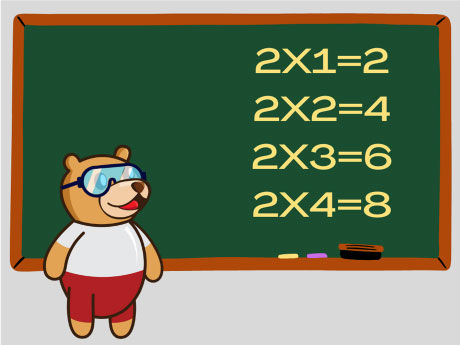
Check out this script! We’re going to team up with a digital friend named Tobi to solve the “Table of 2” in a flash. Instead of writing every line ourselves, we’re using a Loop – which is like a superpower that tells the computer
Let’s make the 2 tables in Python.
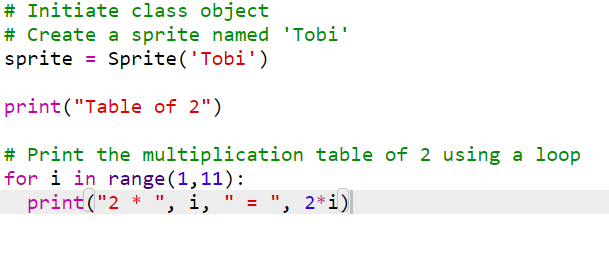
This code does 3 things:
- Creates a Sprite object named ‘Tobi‘
- Prints a heading “Table of 2“
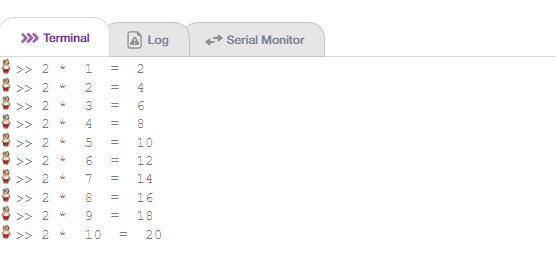
- Uses a for loop to print the multiplication table of 2 (from 1 to 10)
Step-by-Step Code Walkthrough
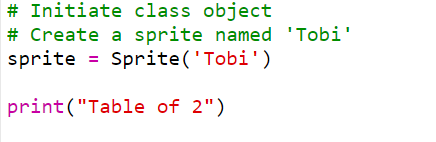
Step 1: Create the Sprite Object
Type,# Initiate class object
# Create a sprite named ‘Tobi’ – After ‘#’ write anything in Python that means comments for the code. Whoever opens this code can understand it.
Type sprite = Sprite(‘Tobi’)
Sprite(‘Tobi’) → calls the class and passes ‘Tobi’ as the name
‘Sprite’ is the variable that holds your new object.
Step 2: Print the heading
Type print(“Table of 2”) – prints the text inside the closed brackets ().
Step 3: Write the for loop
Type for i in range (1, 11):
range(1, 11) → generates numbers 1 through 10 (11 is excluded)
i → takes each value one at a time (1, 2, 3 … 10)
Step 4: Print Each Multiplication Line
Type print (“2*”, i, “ = “, 2*i)
“2 * ” → printed as-is (text)
i → the current loop number
” = ” → printed as-is
2*i → the actual calculation result
Input
Output
Conclusion
In this project, we learned how to write a Python program in PictoBlox to print the multiplication table of 2. We required a computer with PictoBlox installed and the Python (Py Editor) mode selected. We created a Sprite object for Tobi, used the print() function to display a heading, and wrote a for loop with range(1, 11) to automatically calculate and print all 10 lines of the table without repeating the same line of code. With this project, kids and learners will have a better understanding of Python syntax, the role of variables and loops in reducing repetition, and how a single loop block can replace dozens of individual lines of code.